
Page Alert support several entities which are used to separate the supervision of Page Alert for different groups of audio/text recipients, with relevant audio/text contents.
A (Default) entity is always created. You can rename it and use it, or you can add your own entities as required.
Select IPS Pager → Entities left pane menu to display the list of available Entities:
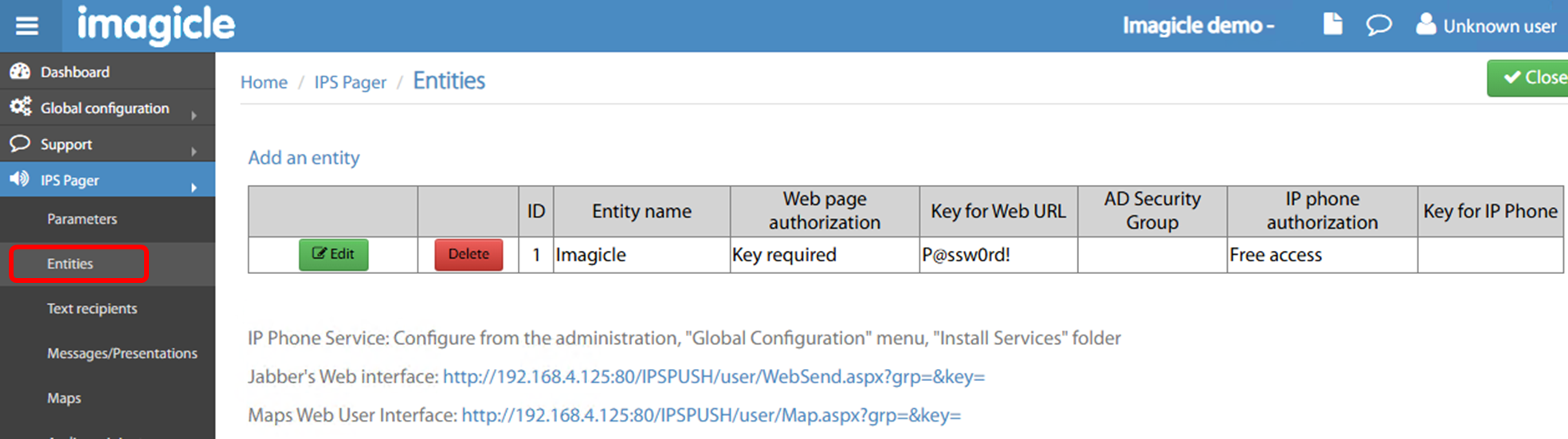
The following settings can be applied to each Entity:
-
Entity name → A name of your choice for the Entity
-
Web page authorization → Multiple options available:
-
Free access → No authentication required for web access
-
Key required → A local password can be set, which can be included in the dedicated web portal URL, like:
http://<Imagicle_EN_IP>/IPSPUSH/user/WebSend.aspx?grp=1&key=P@ssw0rd!
-
where <Imagicle_EN_IP> is the Imagicle EN server’s FQDN or IP; grp=1 is the Entity ID automatically assigned by the application..
-
Windows user group → In this case, the authentication is performed against MS Active Directory, within the AD Organization Unit (OU) specified in AD Security Group field.
-
IP phone authorization → Two options available:
-
Free access → No authentication required while invoking the Page Alert Phone Service.
-
Key required → A numeric PIN must be entered while invoking the Page Alert Phone Service. PIN is configured in Key for IP Phone field.
-