
Applies to:
-
A domain with strict password validation policies
-
Imagicle UC Suite version 2019.Summer.1 or above
Description:
It might happen that UC Suite installation setup fails with the following error:
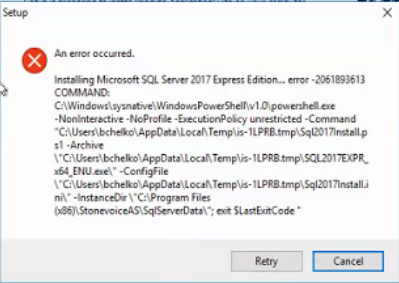
Installing Microsoft SQL Server 2017 Express Edition... error -2061893613
COMMAND:
C:\Windows\sysnative\WindowsPowerShell\v1.0\powershell.exe -NonInteractive -NoProfile -ExecutionPolicy unrestricted -Command "C:\Users\bchelko\AppData\Local\Temp\is-1LPRB.tmp\Sql2017Install.ps1 -Archive \"C:\Users\bchelko\AppData\Local\Temp\is-1LPRB.tmp\SQL2017EXPR_x64_ENU.exe\" -ConfigFile \"C:\Users\bchelko\AppData\Local\Temp\is-1LPRB.tmp\Sql2017Install.ini\" -InstanceDir \"C:\Program Files (x86)\StonevoiceAS\SqlServerData\"; exit $LastExitCode "
Cause:
The default password for the SQL Server administrative user is not strong enough for the domain policies.
Solution:
Abort the setup and re-run it from the command line with the following parameter (replacing the red placeholder with a new and strong enough password)
path/to/ImagicleApplicationSuite-version.exe /SAPASSWORD=new_strong_password
Please mind current MS-SQL password guidelines, to avoid entering a weak password:
-
At least eight characters long, up to max 128.
-
Combines letters, numbers, and symbol characters within the password.
-
Is not found in a dictionary.
-
Is not the name of a command.
-
Is not the name of a person.
-
Is not the name of a user.
-
Is not the name of a computer.
-
Is changed regularly.
-
Is different from previous passwords.
Moreover, certain symbols must be avoided in SQL Server login and/or password: [] {}() , ; ? * ! @ ' ^