
Imagicle EN Voice Alert application can be configured from the same Imagicle/Telisca Framework web portal, used to apply common configurations.
From left pane web panel, please select Emergency Notification → Parameters. The following page appears:
Activation
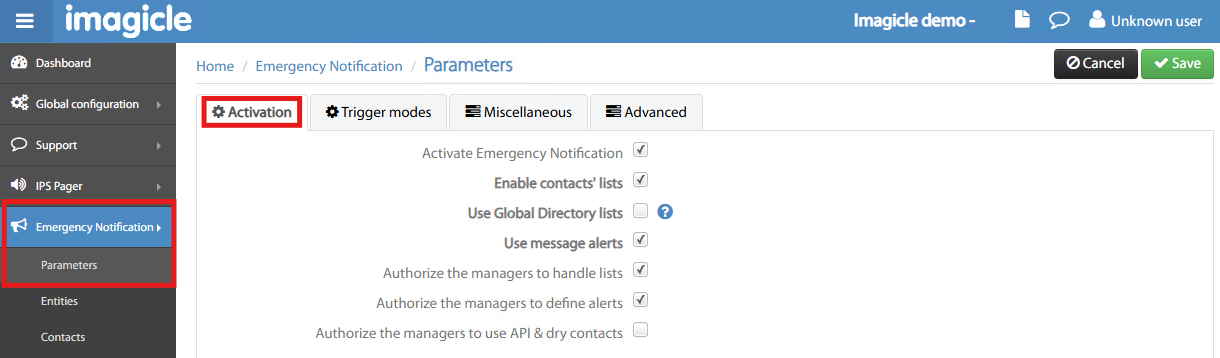
Activation tab includes the following flags:
-
Activate Emergency Notification → Enable the application (must be set to allow triggering alerts)
-
Enable Contacts’ lists → if enabled, you can create a list of contacts to be alerted upon emergency
-
Use Global Directory lists → You can retrieve the list of contacts from an existing directory defined in Contact Manager Enterprise app (relevant license is required)
-
Use message alerts → Allows to send text messages, other than voice messages
-
Authorize managers to handle lists → Enabled Managers to add/remove alerted contacts
-
Authorize managers to define alerts → Enabled Managers to add/remove alerts
-
Authorize managers to use API & dry contacts → Enabled Managers to configure trigger points based on API and/or dry contacts interface
Trigger modes
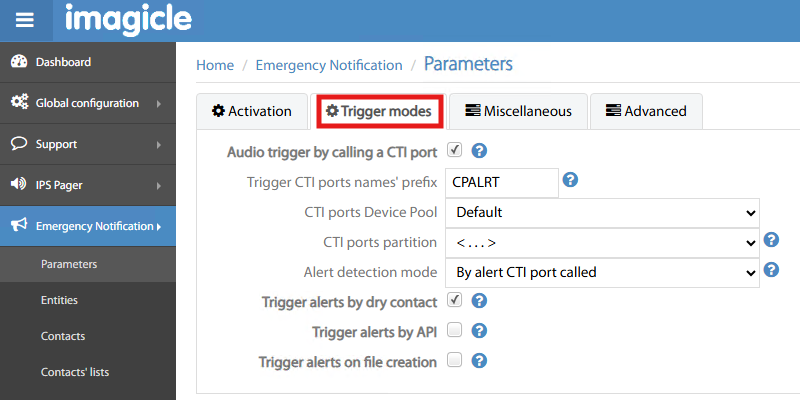
Trigger modes tab includes the following parameters:
-
Audio trigger by CTI port → Enable multiple concurrent alert triggers by calling CTI ports
-
Trigger CTI ports prefix → This is the prefix name added to CTI ports created by EM Voice Alert
-
CTI ports Device Pool → You can choose an available Device Pool, as retrieved from CUCM
-
CTI ports partition → You can choose an available Partition, as retrieved from CUCM
-
Alert detection mode → Two available options:
-
by alert CTI port called → allows to trigger multiple simultaneous alerts by dialing a range of CTI ports
-
by calling DN → allows to trigger one alert at a time by dialing a specific Directory Number
-
-
Trigger alerts by dry contact → Enable alert trigger by a contact closure on “ControlByWeb” contacts-to-IP interface.
-
Trigger alerts by API → Enable alert trigger by calling a http web service.
-
Trigger alerts on file creation → Enable alert trigger by copying a text file in a directory of Imagicle EN server. In the alert, you can define the prefix of the file to be detected and optionally a keyword to search in the text file (in case the same text file could generate different alerts). When the alert is triggered, the file is purged.
Miscellaneous
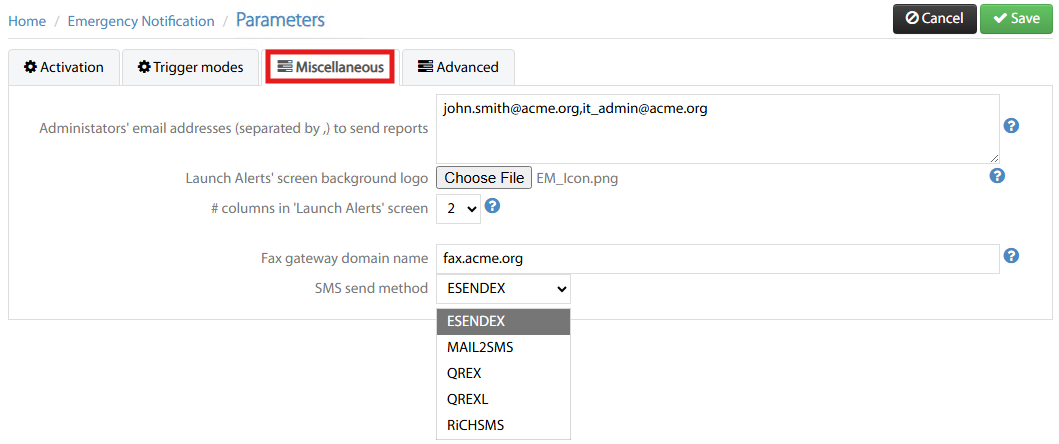
Miscellaneous tab includes the following parameters:
-
Admin email recipients for reports → You can add a list of email recipients who’s going to receive a detailed report of the last accomplished alert cycle.
-
Launch Alert screen logo → this is the custom logo which appears in the Launch Alert! web page
-
Number of columns in Launch Alert page → Depending on the number of configured alerts, you can change the columns layout accordingly.
-
Fax gateway domain → Voice Alert can send fax alerts to contacts by leveraging Imagicle Digital Fax. If the contact's fax number is +33146452157, Voice Alert sends an email to +33146450527@fax.acme.org where fax.acme.org is the customer’s Fax gateway domain.
-
SMS send method → You can choose 5 different supported SMS Providers. Esendex credentials must be added here. For other providers, you can add specific connection details using relevant fields appearing underneath pull-down menu.
Advanced
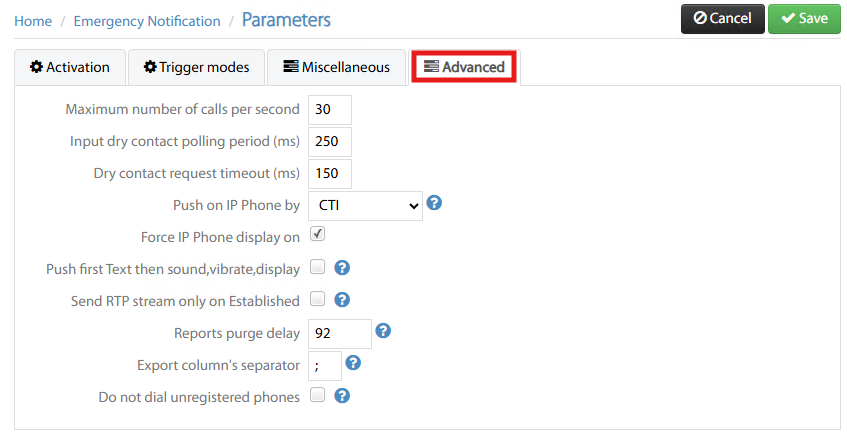
Advanced tab includes some parameters to be tuned by Imagicle Tech Support only. Keep them with default values, except the following:
-
Push on IP Phone by → You can choose the method to push text messages to phone devices: CTI or http. For the latter, please make sure that a proper Authentication URL is configured on CUCM.
-
Force phone display on → When an alert is received on IP Phone, its display backlight is turned on.
-
Push first Text then sound etc. → Enable this flag if alerts must be received in old Cisco IP Phone series/models.
-
Do not dial unregistered phones → to avoid sending alerts to unreachable/turned off phones.