
Handling voice transactions
Imagicle AI Contact Center can handle your inbound voice calls by leveraging best in class tools and applications to fulfill the Easy Welcome & AI Routing layer, by combining the Imagicle Auto Attendant, AI Receptionist and Advanced Queuing, to manage a single entry point for every voice interaction.
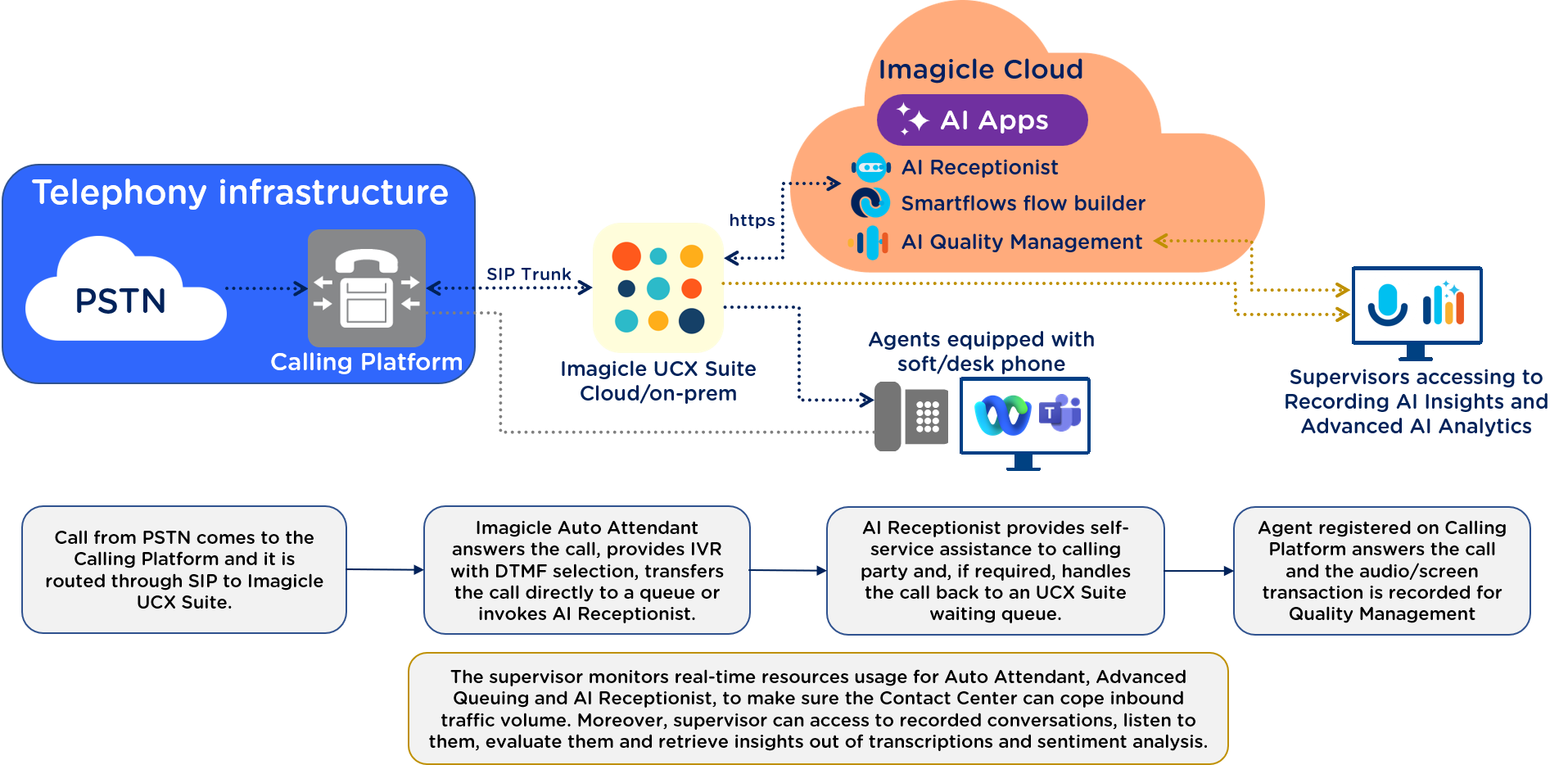
Inbound PSTN calls are first of all hitting the Calling Platform which in turns dispatches them to the Imagicle Auto Attendant, to optionally provide a multilevel menu structure with DTMF selection and/or simply handle the call to the AI Receptionist.
Imagicle AI Receptionist (built on the Smartflows no-code flow builder, configured in AI Receptionist - Configurations) engages first. Using generative, human-like AI voice, it holds a natural conversation with the caller in their own language, determines intent, and decides what happens next: resolve it immediately (FAQs, appointment booking, ticket creation via CRM/ERP integration through MCP or API), or hand it off. If the caller needs a human, Imagicle Advanced Queuing enqueues the call and routes it to the right skill or department, leveraging Imagicle Contact Manager VIP directories to prioritize calls coming from important contacts; Auto Attendant's IVR services structures the flow and welcome experience underneath call paths. All the while, the supervisor's real-time dashboard is watching queue status and agent availability, even before an agent picks up.
Human Agent takes over
If the interaction is escalated, the call is queued in Imagicle Advanced Queuing ACD application, based on required department or service, and eventually it is picked up by the Agent in own workspace, depending on assigned profile: the Voice CORE Web Client, embedded directly in Webex or Microsoft Teams for lightweight call control, or the Voice PRO Agent Console, a dedicated desktop client with full CTI call control handling. Either way, the agent receives the call and handles it itself or transfer it to another colleague or department.
After the call ends: recording, analysis, and reporting
Once the interaction closes, a second workflow kicks in behind the scenes, powered by a different set of Imagicle apps:
Imagicle Compliancy Recording captures the call and, where enabled, the agent's screen, applying Compliance AI Redaction to strip sensitive data (card numbers, PII, PHI) automatically. That recording feeds AI Insights Quality Management (configured in Compliancy Recording with AI Insights - Configurations), which generates a transcription, runs sentiment analysis, produces an AI summary, and can feed manual, AI-assisted, or fully automated Agent Scoring. All of it rolls up into Advanced AI Analytics, giving supervisors ready-to-use dashboards on agent and queue performance, exportable and schedulable, closing the loop back to the oversight they had in real time during the call.
Together, the two flows show the full lifecycle: Easy Welcome & AI Routing (AI Receptionist, Advanced Queuing, Auto Attendant) at the front door, the Agent Workspace (Smart Web Client or UCX Agent Console) for live handling, and Imagicle Recording → AI Quality Management → Historical AI Reporting as the analytics backbone — with the supervisor's real-time view spanning the whole thing.
Handling Digital Transactions
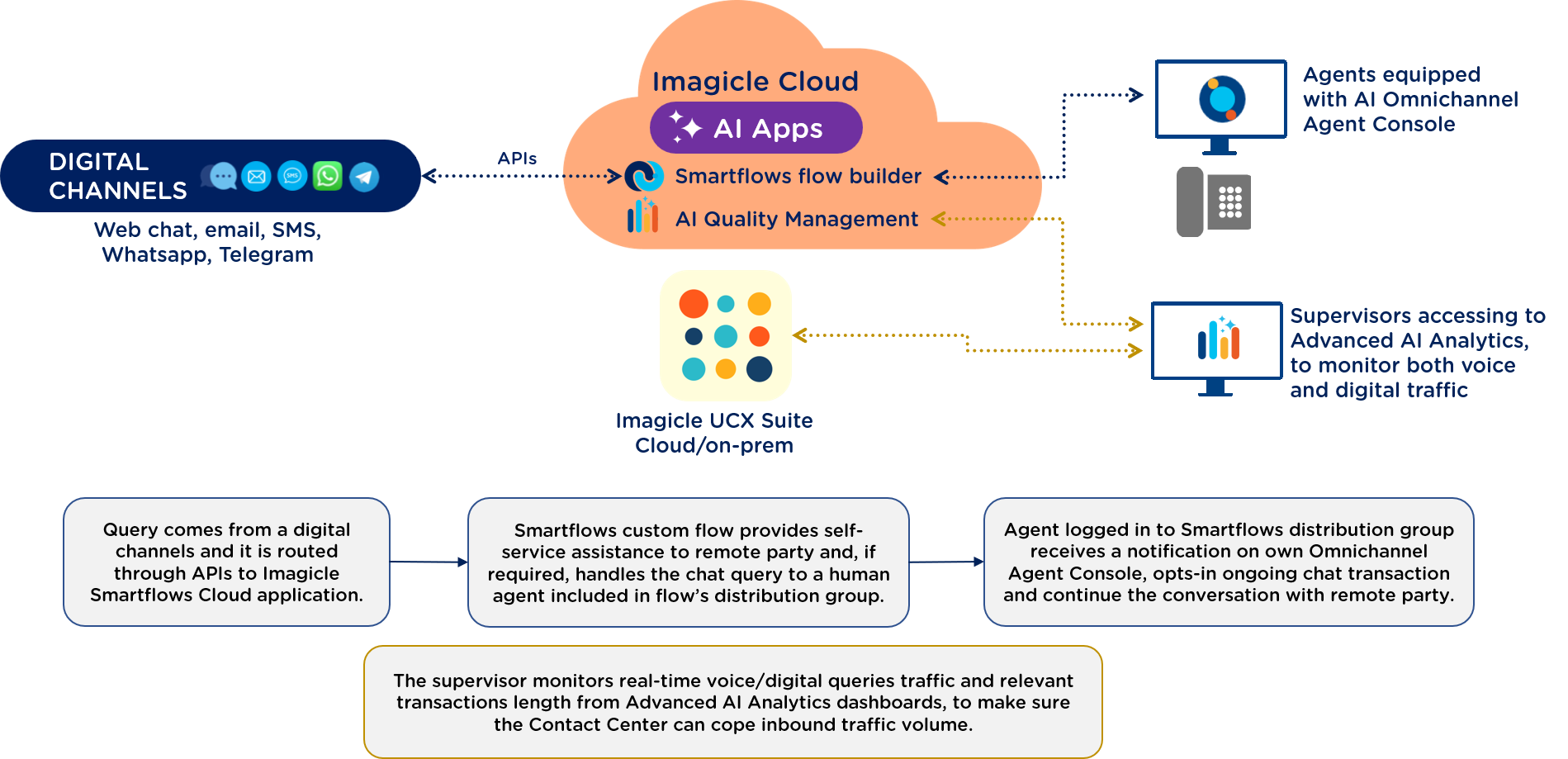
Just like a voice call, a digital interaction enters through Easy Welcome & AI Routing, but here a virtual digital agent, powered by the Imagicle Smartflows omnichannel flow designer (configured in Smartflows - Digital Interactions Configurations), handles chat-based channels through dedicated digital connectors. It reads intent from the incoming message, holds a conversational exchange, and decides whether to resolve the request itself or route it to a human agent — the identical decision point as a call, just working over text instead of speech.
Human agent takes over
If escalated, the chat lands in the same agent workspaces used for calls: the Voice CORE Web Client, with omnichannel support built in as an option (WhatsApp, SMS, Telegram, website chat) alongside its calling-platform integration, or the UCX Agent Console AI Omnichannel, whose digital capabilities let agents manage multiple conversations at once, view full chat history for context, and exchange messages and attachments — all in the same interface used for calls, so agents aren't switching tools between channels.
After the interaction ends: digital analytics and reporting
The post-interaction flow is shorter for digital than for voice, since there's no call or screen recording step — instead it goes straight from the closed conversation into digital-specific analysis and reporting:
Digital interaction analysis (an Omnichannel-tier capability) reviews the closed conversation, and the results feed into the same Historical AI Reporting dashboards supervisors use for voice, so queue and CX performance can be tracked consistently across both channels rather than in separate silos.
One structural note worth flagging: this digital path is only fully available on the AI CC Omnichannel profile — Voice Core profile requires Omnichannel add-on, while Voice Pro is voice-first and doesn't include digital channels, the flow builder for digital agents, or digital interaction analysis. So which of the three agent profiles a user is licensed under directly determines whether they can participate in this digital workflow at all, not just how they experience it.
Conclusions
Whether the interaction starts as a phone call or a digital message, Imagicle AI Contact Center routes it through the same underlying logic: an AI engine that resolves what it can and hands off what it can't, an agent workspace that gives humans full context the moment they pick up, and a supervisor and analytics layer watching and learning from every interaction, live and after the fact. The result is one consistent, AI-driven experience across voice and digital channels — built on the calling platform you already have, and scaled up or down per user through the three agent profiles, so the depth of tooling matches the role rather than being one-size-fits-all.
Related configuration pages in this space