
From UCX Platform Home page, you can click on Licenses icon 
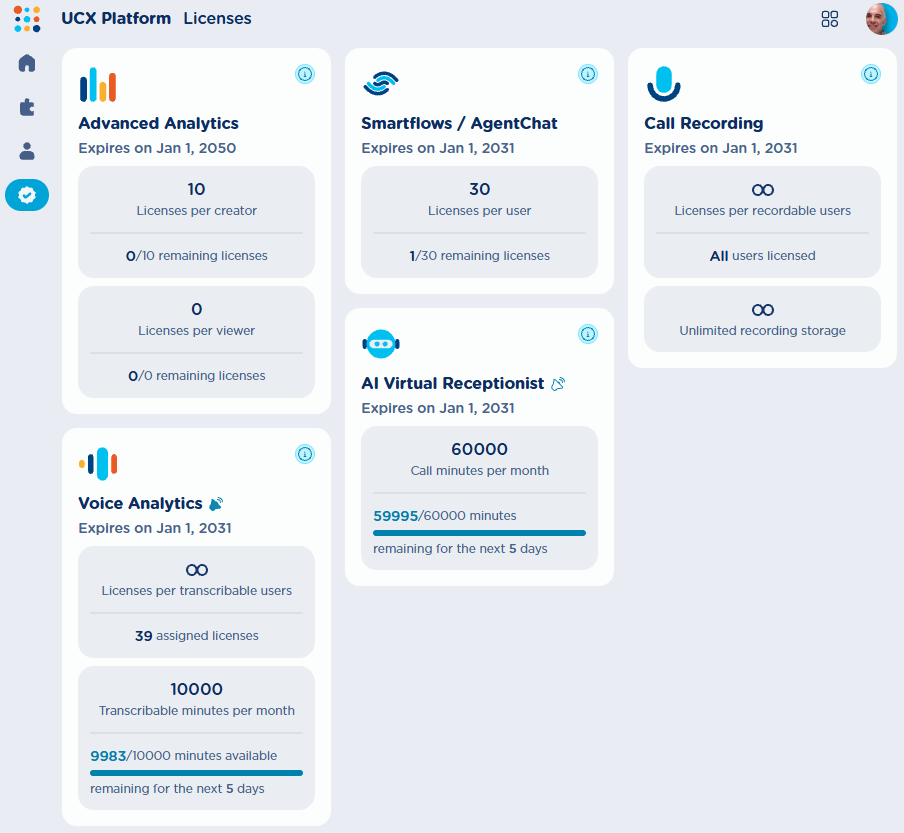
For each enabled UCX Platform application, the following data are displayed:
-
Application name → Smartflows, Virtual Receptionist, etc.
-
Expiration date → License expiration for each app
-
License volume → Number of purchased users/channels/minutes/calls licenses subscription
-
Residual licenses → Assigned/used and residual amounts.
Licenses already assigned to users appear in UCX Platform Users Management except AI Receptionist, where relevant license is assigned at customer level and it is accessible to all UCX Platform administrator users.
An info 
An alert 
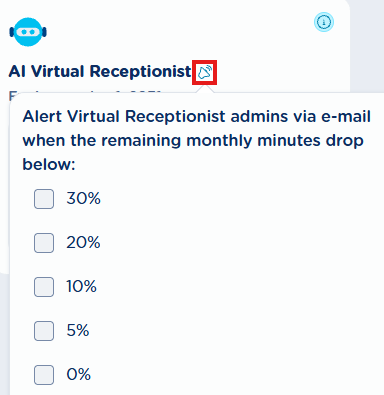
If relevant threshold is reached, an email notification is sent to the relevant application’s administrators.
Within same page, Imagicle highlights if licenses are going to soon expire, with a yellow tag:

For licenses already expired, a red tag is displayed instead:
