
Imagicle Advanced Queuing allows to embed Vxml scripts to implement customized call flow which can’t be achieved with the standard Imagicle Auto Attendant application.
These scripts might include email sending, table creation and integrations with third party applications through web services.
They are typically uploaded from Advanced Queuing web portal, replacing an audio prompt in Voice messages tab.
New VoIP libraries in 2026.Winter.1 release and above
Up to Imagicle 2025.Summer.1 UCX Suite release, Vxml scripts were following a specific syntax dictated by the adopted VoIP libraries.
Starting from UCX Suite rel. 2026.Winter.1, Imagicle adopted the latest VoIP library version, which provides higher performances and less memory/CPU usage.
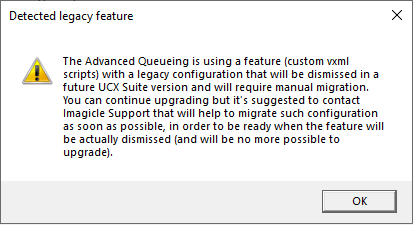
For compatibility sake, Imagicle decided to keep both VoIP libraries, allowing to run the existing Vxml scripts without any change. During the update to 2026.Winter.1, just the following warning is displayed:
Update to 2026.Spring.1
This update introduces a breaking change in Vxml syntax, disabling the existing scripts previously running. The dual libraries concept adopted in 2026.Winter.1 is removed, so the following verification procedure must executed before the actual release update.
Verifications before updating to 2026.Spring.1
To prevent service outages from unsupported scripts, Imagicle offers a method to verify your installation and confirm no unsupported VXML scripts are in use.
Please run the UCX Suite installation package (below sample) from file system (RDP session):
ImagicleApplicationSuite-CCM-2026.Spring.1.exe /ONLYPREUPGRADECHECK
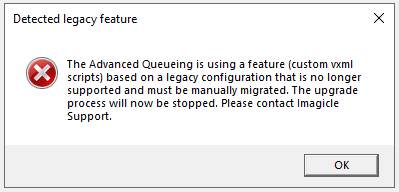
The argument “ONLYPREUPGRADECHECK” prevents the full installation of the release and just performs an internal check for any existing Vxml scripts. If detected, the following dialog appears:
How to fix VoiceXML scripts
If above dialog is displayed, please contact Imagicle Support. They can take care of adapting the existing scripts to the new valid format, eventually allowing to update your installation to the latest release.