
Personal Directories
Each user can create own personal directories including contacts only accessible by the user who created them, if he/she has at least the base access to the application (level 2 or higher). The owner of a personal directory can always add, edit and remove its contacts. The owner of a personal directory can also change its description or delete the entire directory.
The personal directories cannot be viewed by the administrator or by any other user. Consequently:
-
Personal directories cannot be assigned to a User Department.
-
Devices not assigned to any user cannot display personal directories
Personal Directories cannot contain VIP contacts.
Corporate Public and Department Directories
Contact Manager manages two types of Corporate Directories: public and department. Public directories are meant to be available to all UCX Suite users, department directories are meant to be available to a subset (group) of Imagicle users.
When a new directory is created, you can choose to restrict access to its contents to a group of users by assigning a Department to it. If you do not assign any department to the directory, it will be available to all users.
The Department property determines if a directory can be viewed (that is: browsed and searched) based on the following criteria:
-
If the user does not belong to any Department: he/she can view all Directories (assigned AND not assigned to a specific Department).
-
If the user belongs to one or more Department: he/she can view own Department directory and those that are not assigned to a Department. If no Directory has been assigned to own Department, then the user can only view the directories that are not assigned to a Department (that is, Public Directories).
-
User who can view all Public Directories (permission level 8 or higher): he/she can view all Department Directories (as the User that doesn't belong to any Department), even if he/she has been assigned to a specific Department.
-
User who does not have access to the application (permission level lower than 2): he/she cannot view any directory regardless of other access criteria.
-
Unrecognised user - anonymous requests: he/she can view only the directories that are not assigned to any Department. This feature is not available through the web interface because you always have to login, but can affect requests from phones not correlated to any user.
Managing Public and Department directories
If a Directory can be viewed by a User, this doesn't necessarily mean that he/she can change its properties (like the description, department, synchronization.. ) or delete it. Standard User can only view the public directories.
Viewing a directory contents means that you can browse and search its contacts.
Contact Manager allows two administrative roles: global administrators and department administrators. Global administrators can always add, edit properties, remove and view all the directories. Department administrators are global administrators limited to one ore more department.
The User Permission Level and the Department the user is assigned to determine the possibility to modify properties, delete or add new directories:
-
User who does not have access to the application (permission level lower than 2): he/she cannot view any directory
-
User without modification permissions (permission lower than level 6): he/she cannot modify the list of the directories
-
User with access to the department directories properties (permission level 6 or more): he/she can modify, delete or create new directories of own department. He/she cannot modify the properties of directories that are not assigned to any department (i.e. public). If the user is not assigned to a department, he/she can modify no directory
-
User with complete access to the directories (permission level 8 or higher): he/she can modify, delete or create new directories and can assign them to a department
-
Unrecognised user: he/she cannot modify the list of the directories. This feature is not available through the web interface
Local Directories
While Personal, Public and Department directories are meant to contain external contacts, Local Directories contain the internal Users of an organization (also called "colleagues"). Local Directories are always available. They are created when the administrator adds or removers users to the users' list in the Admin ⇒ User Management.
The only way to edit the local directories is through users management. When you edit user properties, the changes are automatically reflected to the Local directories contents. If internal contacts are provisioned from an external source, any modification performed from web portal is lost after next users' synch.
Depending on the UCX Suite settings, there can be one Local Public Directory, or multiple Local directories by department.
Synchronized Directories
The contacts in Synchronized Directories are imported from an external data source. Synchronized directories can be Public, assigned to a Department, or Personal, and their properties can be modified following the standard rules described above.
VIP Directories
Public or Department directories, whether synchronized or not, can be marked as VIP. This affects the way those contacts are used in Imagicle Advanced Queuing.
Local directories cannot marked as VIP. Access to VIP directories follows the standard rules described above.
Adding, Editing and Removing the Contacts
When a directory is created, you specify if its contacts can be edited by anyone by setting the Editable property, meaning "modifiable". The contents of an Editable directory can be edited by all the users who can view them.
The administrators, that is the users who can delete a specific directory, can always edit its contacts regardless the Editable flag.
To summarize:
-
Editable (modifiable) Public or Department directory: the contacts can be added/edited/removed by all users who can view it
-
Non-Editable (modifiable) Public or Department directory: the contacts in these directories can be added/edited/removed only by users that have the right permission to modify or delete that very directory
Exceptions
-
Local directories (that is, the Colleagues directories) are always read-only. The contents of local directories can only be modified through the UCX Suite User Management.
-
If a directory is Synchronized with an external data source, the only way to add, edit or remove the contacts is working on the source. Therefore, the contents are read-only from the Contact Manager users' perspective.
-
Personal directories contents can always be modified by the owner and by no one else.
-
In any case, not recognized users are unable to modify the contacts in any directory.
Examples
Example 1
User Mario Bianchi has permission level 2 for Contact Manager application and belongs to the Sales department.
The administrator created the following directories:
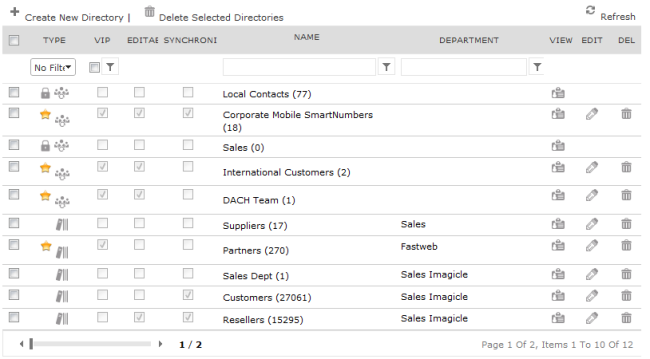
User Mario Bianchi can see all the public directories (the ones with a blank department field). He can also see the Sales directory ("Suppliers") but has no access to the "Partners" directory.
He can then edit the contacts of those directories which have been configured as "user customisable" (editable) by the administrator, for example the International Customers directory. Of course, users cannot edit the contacts of the directories that they can't see.
Example 2
If Mario has permission level 6 and belongs to the department "Sales Imagicle".
He can see all public directories and his department directories. He cannot see "Sales". He can edit the contacts of all directories he can see that are user customisable (modifiable).
With permission level 6 Mario has full control over the directories that belong to his own department ("Sales Imagicle"), which means that he can view, modify, delete or create new directories for his department and edit contacts for them, whether the directories are modifiable or not.
Example 3
Mario has permission level 8 or higher. He has full control on all directories (as the administrator) regardless of which department they belong to and of the modifiability of the directories. But Mario cannot edit the contents of the Local and Synchronized directories.