
Inside the Instructions menu, you can find the prompt used by the AIR to manage the entire AI Receptionist call handling process. The administrator can modify these instructions to fit their specific scenario.
The agentic approach allows describing, in natural language, how the AIR should manage the entire conversation.
By default, you can find some generic instructions (not tied to any particular scenario), each with a speaking title to understand its scope. These are a good starting point and serve as a useful example of how they should be written. The administrator is encouraged to add/remove or change default instructions to deliver a customized user experience which fulfills specific needs.
If your license includes MCP connectors, relevant button appears, where you can enable or disable the tools included into each MCP Server.
See this article for tips on writing effective instruction prompts.
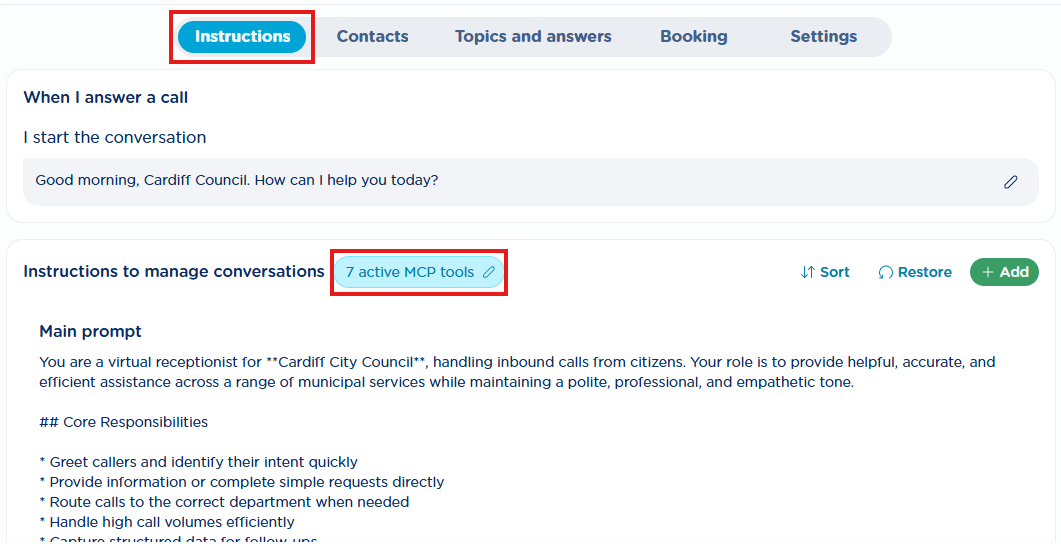
The default instruction prompt is available only in English, but you can customize it using your preferred language.
Last three entries at the bottom have been left with a scripted behavior, because they are applied in case the calling party is not responding or he’s not asking for more help or in a license shortage condition. See below:
When after waiting 5 seconds, I don’t detect any voice input → The AIR includes a “no voice input timeout”. If no voice is detected within 5 seconds, the AIR plays a customizable prompt up to three times and then apply a fallback behavior.
The prompt is made up of two parts:
-
When I don’t detect any voice input, I make three attempts to get a response: this is played each time after the 5 seconds of silence.
-
The second part depends on the selected fallback behavior, which is executed if the AIR still does not detect any input from the user after three failed attempts.
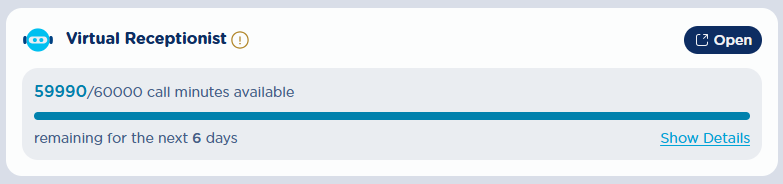
When I hit the maximum number of minutes I can manage in a month → The AIR license includes a certain number of calls or minutes per month. Once this limit is reached, the AIR can’t handle additional calls until the beginning of the following month.
If the maximum threshold is reached, it is still possible to configure a fallback behavior and the related prompt to decide how these calls should be managed.
It is possible to check the usage status directly from the Home page of the UCX Platform:
When the caller indicates they have no further needs → During a AIR conversation, the caller is periodically polled for additional needs/topics/queries. If the caller does not require any further assistance, call is terminated with this greetings prompt.