Configurations on the Imagicle UCX Suite
If you are leveraging an Imagicle UCX Cloud Suite, this configuration is applied by Imagicle Support team.
Please login to Imagicle UCX Suite web portal as administrator and go to Administration ⇒ Synchronize users with an external data source » Configure Data Sources >>
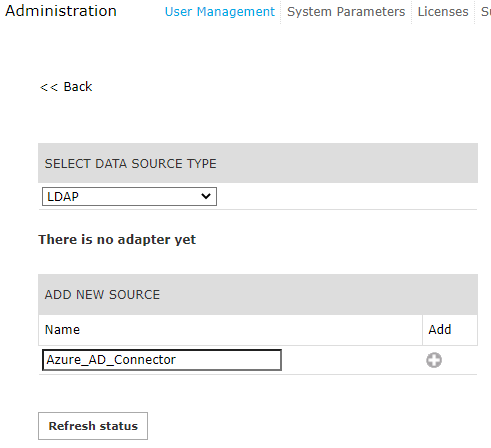
Select LDAP from pull-down menu and add a new source, with a name of your choice:
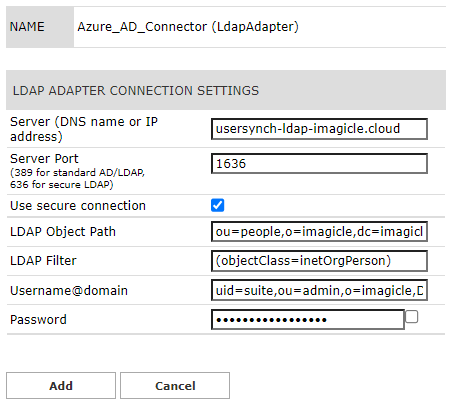
LDAP connector should be configured as per the Suite_ldap_creds.txt file provided by Imagicle support. See below sample:
You can manually run the users' synch straight away or just wait for automatic synch performed during night time (midnight, by default).
LDAP Synch Rules
-
In the Users' synch rules select "Use local IAS authentication" as Users authentication mode.
-
While we import data from Entra ID into our Cloud LDAP and, in turns, into Imagicle UC Suite, we are applying the following standard fields mapping;
|
Azure label |
Azure attribute |
LDAP attribute |
UCX Suite field |
|
Object ID |
objectId |
uid |
UCX Suite Login Username |
|
Display Name |
displayName or uid or cn (commonName) or dn (distinguishedName) or |
displayName or uid or cn (commonName) or dn (distinguishedName) or |
PBX username |
|
|
|
|
Single Sign-on id | Email | ACS SSO UserID |
|
Voice Mail Number |
mail or uid or cn or displayName or FirstExtensionNumber or telephonenumber or pager |
mail or uid or cn or displayName or FirstExtensionNumber or telephonenumber or pager |
Voice Mail Number |
|
First Name |
givenName |
givenName |
First Name |
|
Last Name |
surname |
sn |
Last Name |
|
Preferred language |
preferredLanguage |
preferredLanguage |
Preferred language |
|
Business phone |
telephoneNumber |
telephoneNumber |
First Extension Number |
|
Department |
department |
departmentNumber |
Department |
|
Mobile phone |
mobile |
mobile |
Mobile business number |
|
Street address |
streetAddress |
street |
User Address |
|
City |
city |
||
|
State or province |
state |
||
|
ZIP or postal code |
postalCode |
||
|
Country or region |
country |
||
|
Fax number |
facsimileTelephoneNumber |
facsimileTelephoneNumber |
Fax Number |
|
Soft-Delete |
active |
enabled |
|
|
UserPrincipalName |
UserPrincipalName |
displayName |
SSO username, ACS SSO UserID |
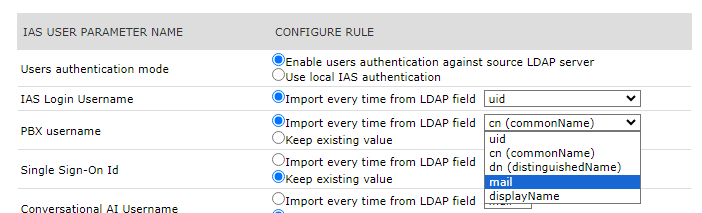
Some mapping can be manually changed by selecting "Synch Rules" menu option. See below sample for PBX username, mapped to email address to support MS-Teams Call Recording:
Local password policy
The password is case sensitive and it must satisfy the following complex password policy:
-
At least a capital letter
-
At least a lowercase letter
-
At least one number
-
At least one special character
-
At least 8 characters
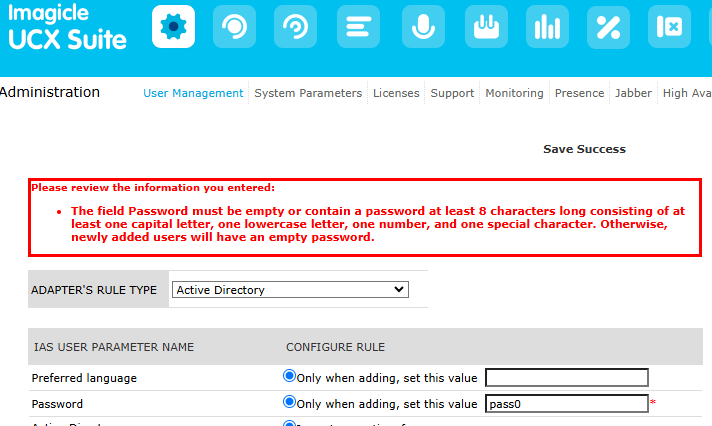
If a non-compliant password is entered, the following message is displayed: