
Imagicle EN Page Alert allows to create a list of predefined audio prompts to be sent to phone recipients. This feature is accessible from IPS Pager → Audio content left pane menu option:
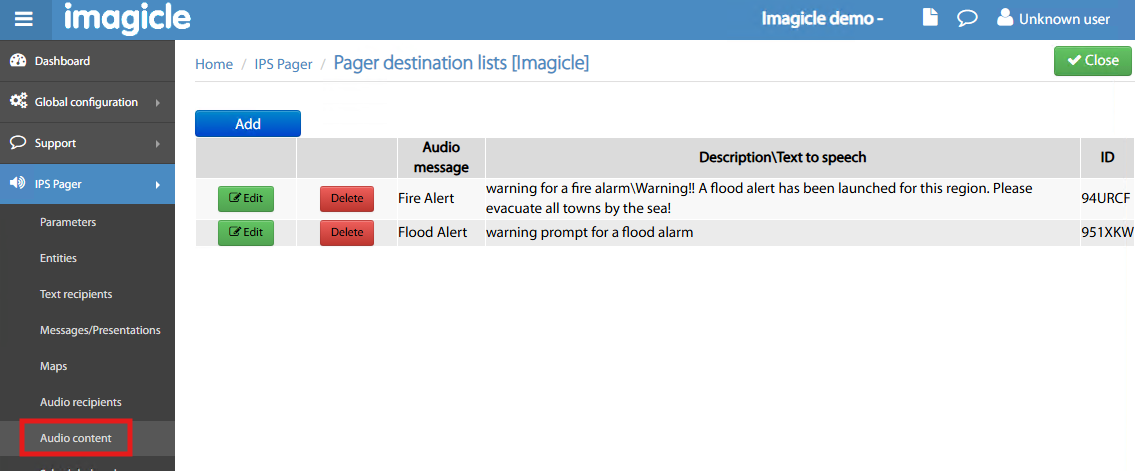
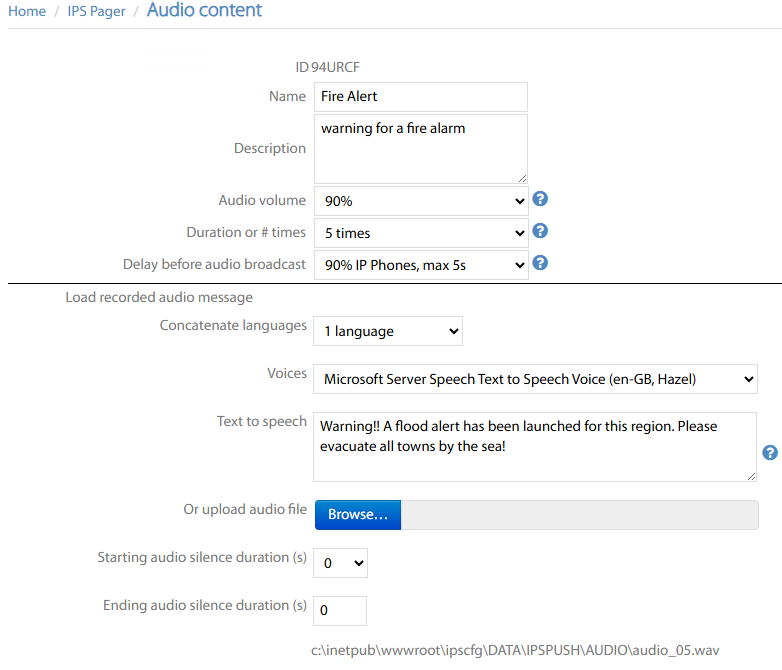
By clicking Add or by Editing an exist audio message, the following window appears, where you can fill or upload the audio content based on the following parameters:
-
Name → Alert prompt name of your choice
-
Description → Brief description of audio content
-
Audio volume → Loudspeaker volume while playing back audio alerts.
-
Duration or # times → Here you can set the alert duration in minutes or the number of times audio prompt is repeated.
-
Delay before bradcasting audio → Two main option groups available:
-
Wait for a fixed amount of seconds before starting audio alert playback.
-
Wait for a percentage of alerted phone recipients to be ready + a fixed amount of seconds before audio playback.
-
-
Concatenate languages → If you opt for a text-to-speech audio alert, then you can choose here in how many languages it should be played back (max 4).
-
Voices → For each language, you can choose relevant Microsoft TTS voice
-
Text to speech → Message content, to be converted to an audio prompt.
-
If you opt for a pre-recorded audio prompt, you can upload it as Wav file. Its server path is displayed at the bottom of the web page.
-
Starting audio silence → Few seconds delay can be added between loudspeaker turned on and audio prompt playback.
-
Ending audio silence → Few seconds delay can be added once audio prompt has been fully played back and loudspeaker is turned off.