
Imagicle ConMan Entp. leverages a number of global settings related to XML/web session timeouts, languages, specific TCP ports and API access.
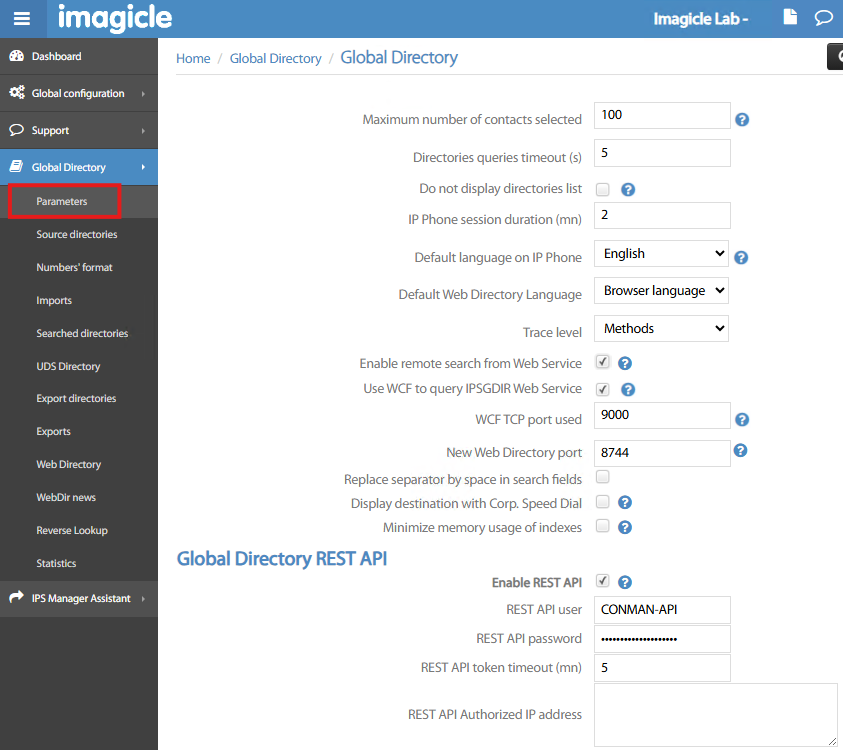
From left pane web panel, please select Global Directory → Parameters. The following page appears:
-
Maximum number of contacts selected → This is the maximum amount of returned contacts while performing a search from IP Phone or from Web Directory. Please tune this parameter depending on number of directories in place and to avoid long waiting time to display results. Max configurable value is 999.
-
Directories queries timeout (sec) → This the query timeout upon contacts search. If timeout occurs, please raise this value or (better) decrease above max contacts results.
-
Do not display directories list → If checked, Imagicle Phone Service does not display the list of defined directories. Contacts search is limited by phone service Parameters.
-
IP Phone session duration (min) → This is the XML/SOAP session duration, while accessing Imagicle directories from relevant Phone Service.
-
Default language on IP Phone → Please choose among six language locales:
-
French
-
English
-
Italian
-
Spanish
-
German
-
Dutch
-
-
Default Web Directory Language → Please choose among seven language locales:
-
Browser own language (default)
-
French
-
English
-
Italian
-
Spanish
-
German
-
Dutch
-
-
Trace level → This is the verbose level of application logs. Please leave it to intermediate “Methods” level, unless requested by Imagicle Support for troubleshooting.
-
Enable remote search from Web Service → Please leave it unchecked.
-
Use WCF to query IPSGDIR Web Service → Check this flag if you wish to leverage WCF (Windows Communication Foundation) for contacts search, bypassing Windows IIS and in turns increase performances.
-
WCF TCP port used → Please leave the default port 9000.
-
New Web Directory port → This is the HTTPS port configured to access Web Directory feature, running as a Windows service through the Imagicle embedded Web Server. Once this port is set, you no longer need to specify it in the URL, which becomes as simple as: https://
<imagicle_FQDN>/directory -
Replace separator by space in search fields → Flag this option if you wish separator chars like “-” or “/” to be replaced with space, to better match contacts' data.
-
Display destination with Corp. Speed Dial → Flag this option if you are leveraging ConMan Speed Dials and you wish to drop the outbound Speed Dial call and re-initiate it with corresponding full number. This mode is useful for showing actual destination number.
-
Minimize memory usage of indexes → Check this flag if you have an overall number of contacts greater than 300,000 and you want to optimize memory usage while loading data.
Global Directory REST API
-
Enable REST API → If you wish to provide the access to Imagicle directories from a third party application, you can enable dedicated APIs, based on the following Base URL: https://
<imagicle_FQDN>/IPSGDIR/ws/api -
REST API user → This is the username to be used for API authentication.
-
REST API password → This is the password to be used for API authentication.
-
REST API token timeout (min) → A token is generated upon each API authentication. This is the token timeout. Once expired, you need to perform a new authentication.
-
REST API Authorized IP address → This is an access list of API’s authorized IP addresses, comma separated.