
Imagicle ConMan Entp. allows to access Imagicle directories from any Cisco IP Phone supporting XML Phone Services. From Imagicle administration portal you can automatically create the Phone Service on CUCM by accessing Global configuration → Install Services left pane menu:
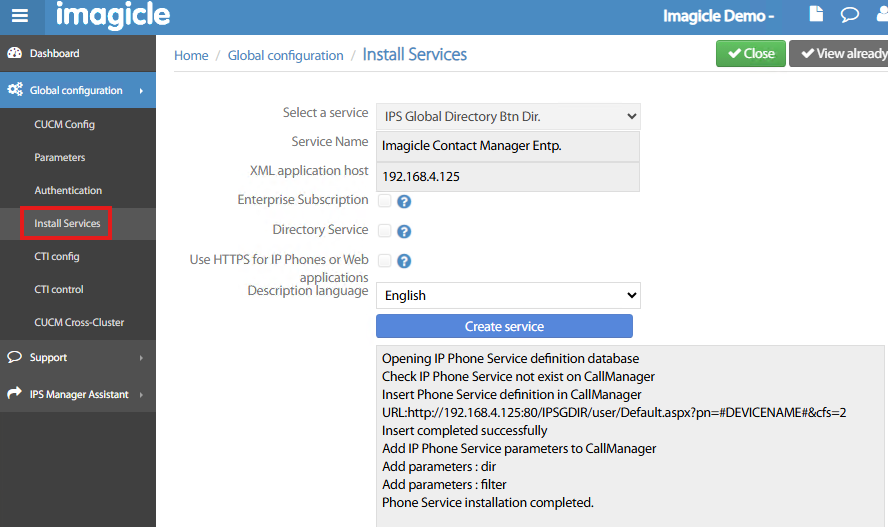
The following settings should be applied:
-
Select a service → Two available options:
-
IPS Global Directory Btn Dir. → Phone Service is created as a Directory service, accessible by hitting Directory button on IP Phone. This is the recommended option.
-
IPS Global Directory Btn Service → Phone Service is created as a Standard Phone Service, accessible through a Service URL (SURL).
-
-
Service Name → A name of your choice, appearing in IP Phone Services menu. We suggest to enter “Imagicle Contact Manager Entp.”.
-
XML application host → Add here IP address or FQDN of Imagicle ConMan server.
-
Enterprise Subscription → Check this flag if you wish to automatically subscribe new phone service to ALL IP Phones configured in your CUCM cluster.
-
Directory Service → Check this flag if you have selected
IPS Global Directory Btn Dir.option. -
Use HTTPS for IP Phones or Web apps → Check this item to leverage encrypted https access to Imagicle ConMan CUCM Phone Service.
-
Description language → This is Phone Service language on IP Phone. You can opt for English or French.
If HTTPS flag is selected, bear in mind that a Trusted Digital Certificate must be installed on both Imagicle server and CUCM cluster.
Once all parameters are correctly configured, you can click Create service button to automatically provision new Phone Service on CUCM. You can follow the real-time creation process in below grey window, as above sample.
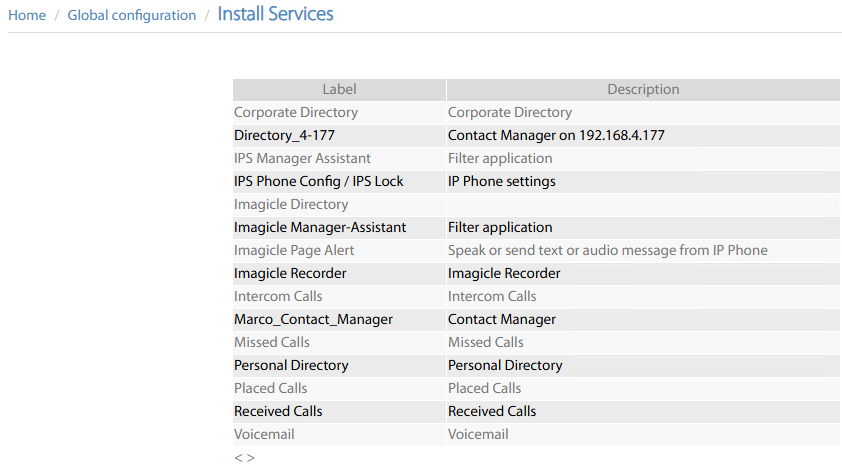
To double-check actual Phone Service creation, you can click on top-right View already installed services to list all Phone Services configured in CUCM (Imagicle and others). See below sample:
Phone Service additional parameters
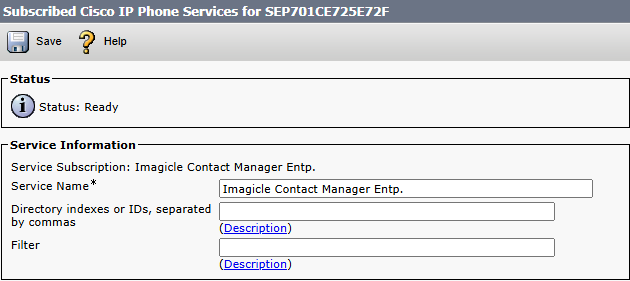
When you subscribe above Phone Service to a phone, you can tune two parameters:
-
Directory indexes or IDs → Here you can add multiple comma-separated directory identifiers, where Phone Service should search within. Syntax includes “dir” prefix, like: dir01,dir02
-
Filter → Filter to be applied for directory search queries.
Change CUCM Global Directory URL
If you want your phone users to access Imagicle ConMan Entp. directories ONLY, without using a dedicated Phone Service, you can replace native CUCM URL Directories with Imagicle ConMan URL. Please login to CUCM administration web portal and go to System → Enterprise Parameters:
Locate “Phone URL Parameters” section and replace existing CUCM URL with Imagicle one:
http://<Imagicle_IP_FQDN>/IPSGDir/user/Default.aspx
Where <Imagicle_IP_FQDN> is the Imagicle Contact Manager Enterprise server’s IP or FQDN. See below sample:
