
Imagicle Manager-Assistant application can be configured from the same Imagicle/Telisca Framework web portal, used to apply basic configurations.
From left pane web panel, please select IPS Manager Assistant → Filter mode. The following page appears:
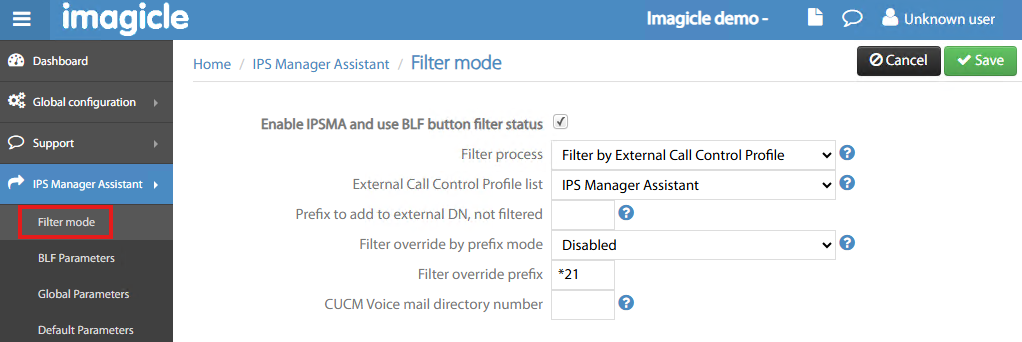
This page includes the following parameters:
-
Enable IPSMA and use BLF button → Enable M/A application (must be set to allow call filtering)
-
Filter process → Two available options:
-
CTI Filtering → Obsolete method to intercept managers' calls (not recommended)
-
Filter by External Call Control Profile (ECC) → This is the recommended method to filter managers' calls
-
-
ECC Profile list → Pull-down menu showing all ECC profiles defined in CUCM. You should pick the M/A-related ECC Profile.
-
Prefix to add to external DN, not filtered → This is an optional prefix which can be added to the external calling number, before comparing it to the list of numbers not to be filtered (white list).
-
Filter override by prefix mode → This feature allows authorized parties to directly call a filtered Manager by adding a prefix to Manager's number. It requires a Translation Pattern on CUCM.
-
Disabled → Override is disable
-
Enable only between Managers → add prefix to call Managers
-
Enable for managers and assistants → add prefix to call Managers and Assistants
-
Enable for all internal directory numbers → add prefix to inbound internal calls
-
-
Filter override prefix → This is the prefix added for filter override feature (if enabled)
-
CUCM Voice mail directory number → If set, unanswered diverted call to assistants can be overflown to a Voice Mail number.