
Summary & Topics Setting
This feature allows Imagicle Call Recording AI Insights to automatically generate a call summary of recorded conversation, based on its transcribed content.
At the same time, the feature extracts the main topics of the conversation and assign them to the recording, allowing supervisors to easily retrieve multiple conversations by topics search.
Please access to Call Recording Settings page and enable the feature:
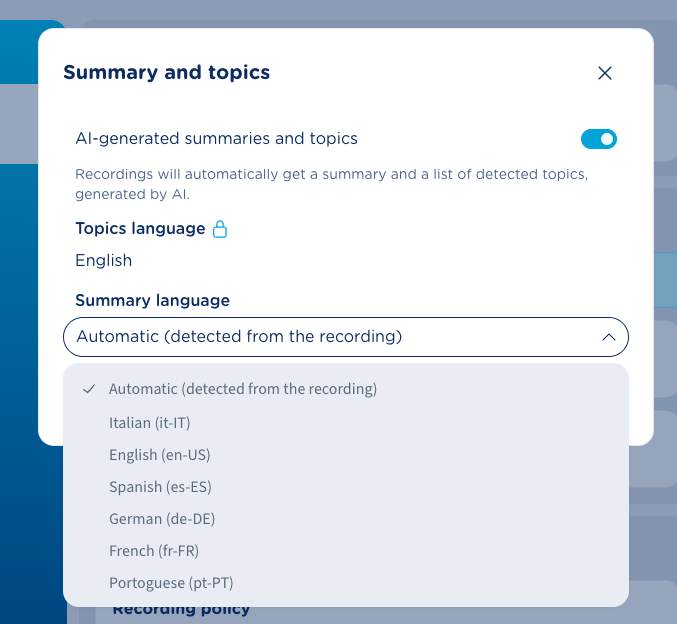
Just toggle the switch, select the proper summary language or just leave the “Auto-detect” option and hit Update.
Please note that Topics language is automatically set and currently it can’t be changed.
Recordings page
This panel, available on left side, includes three different tabs:
Summary and Topics
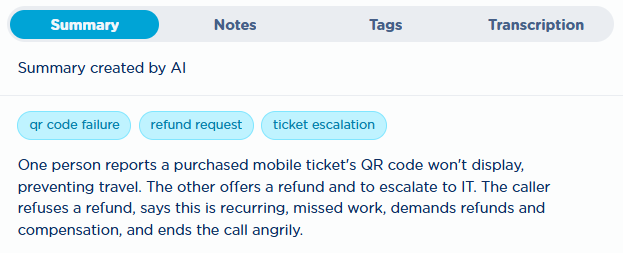
If this feature is enabled, it automatically generates and displays an AI-based call summary of recorded conversation, based on its transcribed content.
At the same time, the feature extracts the main topics of the conversation and assign them to the recording, allowing supervisors to easily retrieve multiple conversations by topics search. See below sample:
Notes and Tags
These two tabs are explained in the Recordings Page article. Just bear in mind that manually added Tags and AI-based Topics are both searchable through respective filters included in “More Filters” button.
Short videoclip